Most websites do not fail on launch day. They slowly rot.
Pages go stale. Offers change. Links break. Events pass. Nobody wants to log in every week and babysit the thing.
That maintenance problem is what I mean when I talk about an agentic website.
What an “agentic website” actually is
The short version is:
An agentic website is a website that AI helps maintain after it goes live.
The important part is after it goes live.
A website generated with AI can still become stale. The agentic part is the workflow behind the site that keeps checking, suggesting, drafting, and preparing useful updates.
It is not a magic, fully automatic website. AI does not need to run the whole thing to be useful. It just needs to remove the boring steps before the decision.
What it can actually do
Depending on the site and the permissions you give it, AI can help:
- Find outdated pages, offers, and information.
- Check broken links and technical problems.
- Draft updates to existing pages.
- Suggest useful new articles from customer questions.
- Watch analytics and surface pages worth improving.
- Prepare SEO titles, internal links, CTAs, and page-structure changes.
- Format recurring information such as events or directory listings.
- Build a preview for a human to review before anything goes live.
The useful version is not sci-fi. It is a practical maintenance system.
A real example: AI Events in Thailand
My AI Events in Thailand page only works if the listings stay current. If the events are old, the page becomes useless.
Building the page once was not the interesting part. The workflow around it is.
AI can help find new events, spot expired ones, format the details, check the links, and prepare the update. I still want a human checking the event and approving what gets published.
That is the pattern I care about: AI prepares the work, and a person approves the risk.
What humans should still control
I do not want AI making every judgment call. Humans should still control:
- Final publishing.
- Brand voice.
- Offers and pricing.
- Business strategy.
- Sensitive performance claims.
- Legal and trust-sensitive pages.
- Anything customer-facing that could damage trust.
Lower-maintenance is real. No-maintenance is fantasy.
The win is not replacing judgment. The win is removing the boring steps before judgment.
Does an agentic website have to use Astro?
No.
A WordPress site can be agentic if AI has safe access, limited permissions, useful checks, and clear approval steps. This is not a claim that WordPress cannot work with AI.
I personally like Astro and file-based sites for some projects because the workflow is easier for me to inspect:
- AI drafts a change in plain files.
- Git shows exactly what changed.
- Automated checks catch obvious problems.
- A preview shows what will go live.
- I approve the result before publishing.
That feels safer than handing AI unrestricted access to a live WordPress dashboard.
Why I started moving some WordPress sites
I still use WordPress, and I am not moving every site just because Astro is newer.
For content, directory, brochure, and marketing sites, the file-based setup has given me:
- Faster pages without a database or large plugin stack.
- Fewer plugin, hosting, and security dependencies.
- Changes that are easy to review in Git.
- A cleaner way for AI to prepare updates.
- Lower running costs on the sites I have moved.
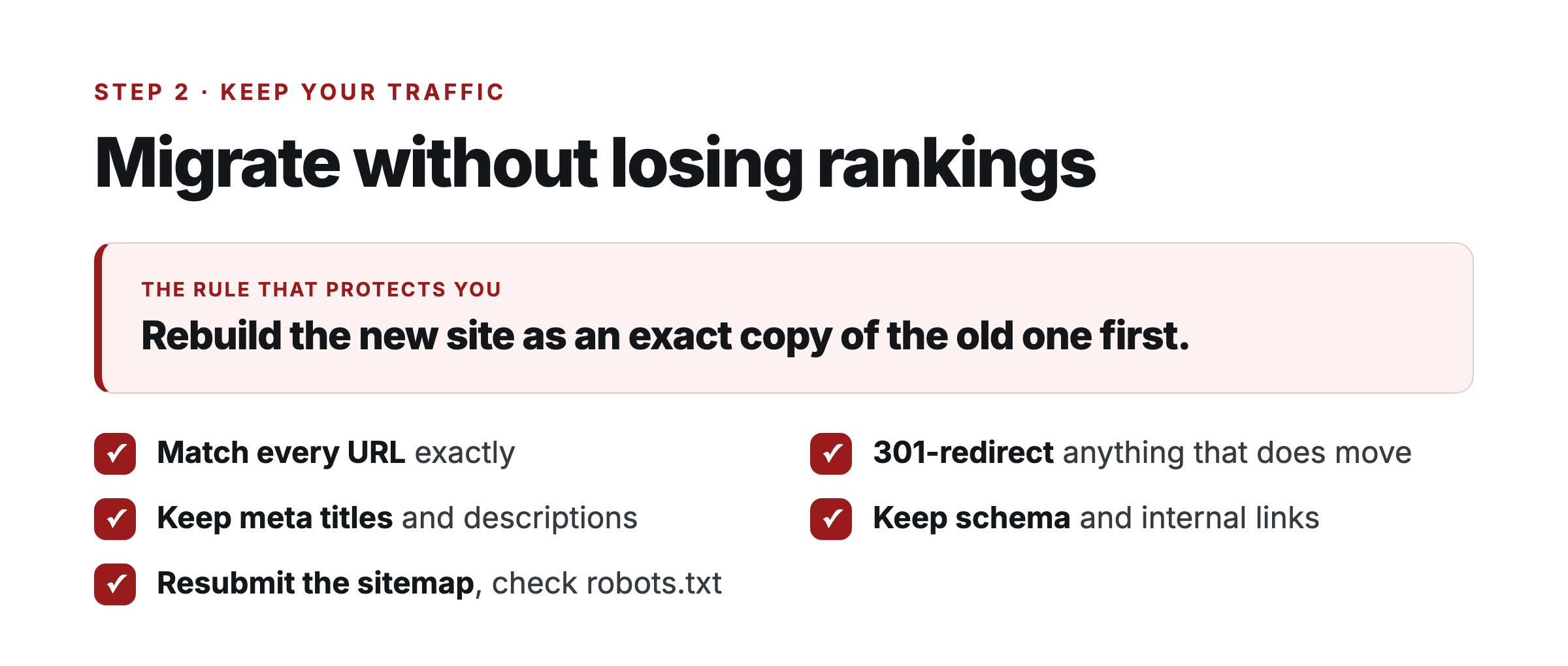
The migration itself still needs care. The rule that reduces the risk is simple: rebuild the new site as an exact copy of the old one first. Keep the same pages, content, and URLs. Improve it after the migration is stable.
I explain why I started in my WordPress to Astro case study. The exact order I follow, including PRIME Migration, is in my WordPress migration checklist.
Moving without losing SEO traffic
These are the migration mistakes that cause the most damage:
- URLs change. Match every URL or redirect it properly.
- Redirects get missed. Map anything that moves with a permanent redirect.
- Titles and descriptions reset. Carry the existing metadata across first.
- Schema and internal links disappear. Check them page by page.
- Sitemaps and robots rules break. Submit the canonical sitemap and verify crawling.
- Analytics vanish. Confirm measurement before switching the domain.
On one automotive site, traffic held after launch and later roughly doubled while the PageSpeed score moved from 66 to 97. That is one result, not a promise for every migration.
Astro does not rank a site by itself. It gives me a faster, cleaner technical base. The content and SEO work still matter. I cover that distinction in Is Astro Good for SEO?.
What you need to set one up
The exact tools can vary, but my current setup uses:
- Astro for the site framework.
- Vercel for hosting and preview deployments.
- GitHub for change history and approval.
- Claude Code, Codex, or another capable AI tool to help prepare changes.
- Automated tests and a human review before publishing.
For an existing site, start with a lower-risk page or smaller property. Do not begin by giving an agent unrestricted control over the site that pays the bills.
If you want the agent itself configured for you, see the done-for-you Hermes Agent setup. Miguel’s BotLaunch team handles the implementation and support.
If you have an established WordPress site and want someone to handle the migration carefully, I help businesses move off WordPress and set up a workflow where AI can assist without owning the final decision.
The related guides below break down migration, SEO, speed, and platform choices separately.